Unity 6.6 WebGPU for Browser IO Fat Games: URP GPU Resident Drawer, STP, and Fish-Net WebGL Fallback
As of Unity 6000.6, WebGPU is a fully supported Web graphics API, no longer experimental — but it is still not the default. WebGL 2 remains what a player gets until you add WebGPU to the Graphics APIs list and drag it to the top of the priority order. That ordering is the production contract for a fat IO game: capable adapters take compute, GPU Resident Drawing, GPU occlusion culling, STP, VFX Graph compute, Adaptive Probe Volumes, and compute skinning; everyone else boots on WebGL 2 without a custom loader dance. The payoff is not “WebGPU is always faster.” Unity’s Web graphics lead has seen both cases where, given the same features, WebGPU is more performant and WebGL is more performant. Resident Drawer only pays when URP is on Forward+ or Deferred+, the API is compute-capable (not OpenGL ES), BatchRendererGroup variants are in the build, and the objects are not Animator hierarchies or meshes over 128 materials. Pellets, props, and static world clutter belong on the GPU path; skinned players usually do not. Graphics Device Filtering in 6.6 lets you deny weak WebGPU adapters instead of trusting browser flags, and you should log `SystemInfo.graphicsDeviceType` because fallback is silent. Browsers only expose WebGPU in a secure context; Unity Play hosts that path but rejects builds over 1 GB compressed. Fish-Net ticks, observers, and Bayou WebGL transport do not change with the graphics API — spend the freed CPU on interpolation and interest management, stay on URP Render Graph (Built-In deprecation starts in 6.5), and treat WebGL as the always-on second backend, not a surprise.
- Put WebGPU first and keep WebGL 2 second so unsupported browsers still boot without a custom fallback UI.
- GPU Resident Drawer, GPU occlusion, STP, VFX compute, APV, and compute skinning need WebGPU compute; WebGL cannot run them.
- Qualify Resident Drawer for Forward+/Deferred+ clutter under 128 materials — skip Animator players and MaterialPropertyBlocks.
- Filter weak adapters, require HTTPS, stay under 1 GB compressed for Unity Play, and log graphicsDeviceType because fallback is silent.
- Fish-Net simulation does not change with WebGPU; keep URP Render Graph and spend CPU on netcode, not extra post-FX passes.
WebGPU is a ship gate, not a URP default
That graduation still does not mean every Web player session will land on it. Treat the Graphics APIs list as a cohort gate for fat browser IO worlds: high-entity clutter that can actually use compute, not a checkbox you expect every browser to tick.
Unity’s 2026 pipeline strategy is equally clear about where those compute paths live. It advances URP and starts official Built-In Render Pipeline deprecation in 6.5. Built-In remains available at least through Unity 6.7 LTS, with support into 2028, so existing titles are not stranded. New browser IO work should not sit on that runway. Ship on URP Render Graph so the WebGPU compute path has a pipeline that can consume it—GPU Resident Drawer, occlusion, STP, and the rest of the compute stack—rather than Built-In compatibility mode that never exposes those features.
| Decision | What 6.6 actually does | What a fat IO title should do |
|---|---|---|
| Web graphics API | WebGPU is fully supported but not default; WebGL 2 remains default until you add WebGPU to the list | Put WebGPU first for the compute cohort; keep WebGL 2 second so unsupported browsers still boot |
| Render pipeline | URP is the 2026 centre of gravity; Built-In deprecation starts in 6.5, still available through 6.7 LTS into 2028 | New titles on URP Render Graph only—not Built-In compatibility mode |
| Who gets the GPU path | Support does not imply every session hits WebGPU | Gate Resident Drawer, occlusion, and STP on clutter that qualifies; do not spend them on every skinned player |
WebGPU is the ship gate for worlds dense enough that CPU draw-call cost and instancing matter; do not park a new URP title on Built-In just because deprecation has a long tail. The next decision is ordering those APIs so fallback stays silent and Fish-Net-safe.
Put WebGPU first, keep WebGL 2 as a silent fallback
Once the Graphics APIs list is open, order is the ship story. Leave WebGL 2 immediately underneath WebGPU so unsupported browsers fail over instead of dying on graphics init. That second slot is not a nice-to-have; it is how a fat IO title still launches on machines that never grew a WebGPU adapter.
Browsers only expose WebGPU in a secure context. Serve over HTTPS. HTTP and file:// hosts miss WebGPU with no editor-style dialog—the player just never sees the compute path. Unity Play can host that secure path; your own CDN must do the same. Treat local file drops as a WebGL-only session every time.
The same Player can be a compute-rich WebGPU session or a WebGL 2 session where GPU Resident Drawer, STP, GPU occlusion, VFX Graph compute, Adaptive Probe Volumes, and compute skinning are simply unavailable. Do not gate Fish-Net connection, scene load, or matchmaking on `SystemInfo.graphicsDeviceType`. Gate only visual and instancing features: Resident Drawer batches, STP, GPU occlusion, and any material that assumed compute.
Document two visual budgets before you enable the API, or QA will file every WebGL session as a defect. Budget A is the WebGPU fat-world look: high-entity clutter on Resident Drawer, STP upscaling, GPU occlusion. Budget B is the WebGL 2 look: fewer instances, CPU culling, no STP, coarser occlusion. Same netcode, same match, two honest render contracts. If a pellet field or prop forest only looks correct on WebGPU, it does not belong in the shared scene until both budgets are signed off.
What WebGPU compute actually unlocks for fat IO worlds
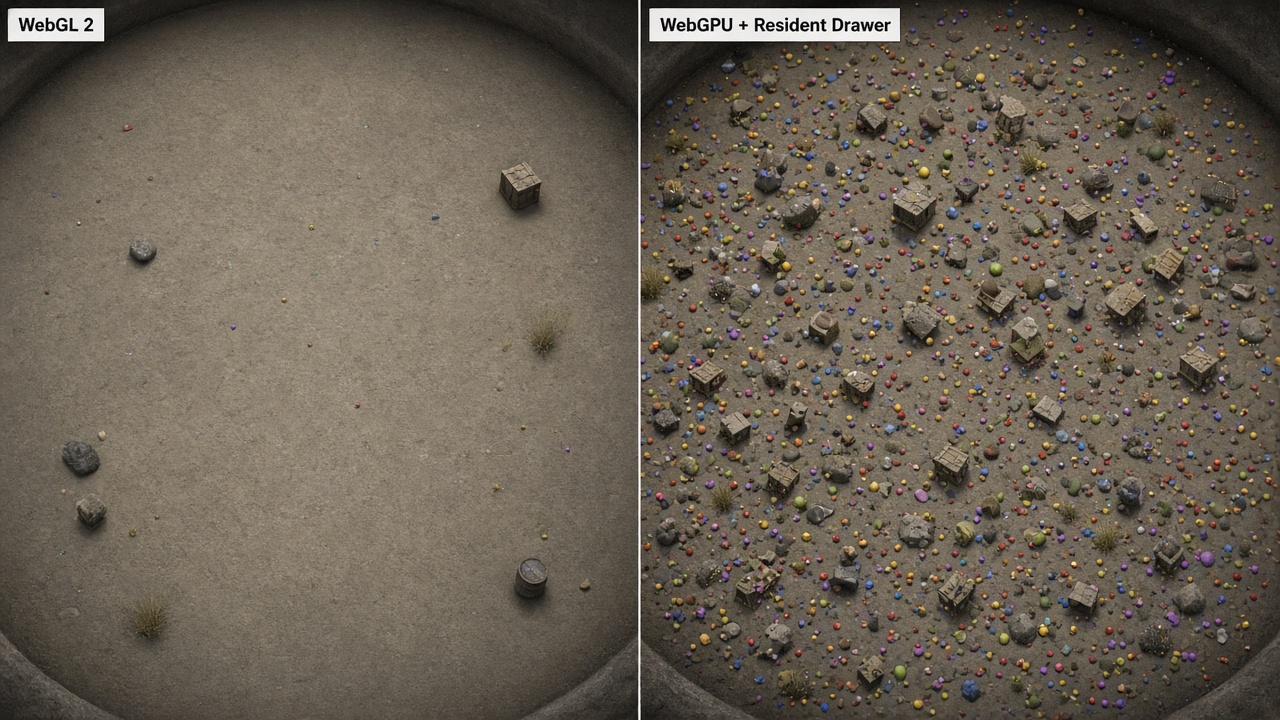
Once those two visual budgets are written down, the reason WebGPU sits first is compute. In the browser, compute is what lets URP offload draw-call preparation to the GPU. A WebGL 2 fallback is not a slightly slower version of the same renderer—it is a different renderer that never sees Resident Drawer or GPU occlusion at all.
Compute skinning in particular moves skinned-mesh deformations onto GPU compute shaders and frees CPU time that would otherwise sit in the animation loop. For an IO title that is already paying Fish-Net ticks, observers, and interpolation, that CPU is more valuable than another cosmetic particle system.
Spend compute where the arena is actually fat
High-leverage uses for browser IO are narrow. Instanced pellets, pickups, and static props are the entities that multiply draw calls. GPU occlusion belongs on cluttered arenas where walls, crates, and foliage hide most of the field. STP belongs when you must hold a 1080p-class look on integrated GPUs without dropping the simulation budget. Those three pay for the WebGPU cohort. Everything else is optional.
Compute skinning and VFX Graph compute particles are cosmetics. They must degrade on WebGL without touching Fish-Net spawn, TimeManager authority, or animation ownership. A WebGL client that still interpolates the same NetworkObject is a successful fallback; a WebGL client that cannot spawn because a compute-skinned prefab failed to instantiate is not. Feature flags follow SystemInfo.graphicsDeviceType and your Graphics Device Filtering list, not marketing copy that lists STP as a title-wide requirement. If the adapter is denied or the API is WebGL, you simply do not enable those URP features—the match still runs.
Compute features stay gated to hardware that can actually run them, while the networking path stays identical. The next decision is which entities are allowed onto GPU Resident Drawer at all.
Which IO entities actually belong on GPU Resident Drawer
Compute is the gate; eligibility is the filter. GPU Resident Drawer will not magically instance every Mesh Renderer in a fat IO arena. It only runs on URP assets whose renderers use Forward+ or Deferred+. A Forward-only browser template never takes the instanced path, no matter how high you put WebGPU in the Graphics APIs list. If your URP asset is still on classic Forward for “WebGL compatibility,” Resident Drawer is off for that pipeline even when the player’s adapter is compute-capable.
The same manual rule is why WebGL 2 cannot be a Resident Drawer fallback. The feature needs graphics APIs and platforms that support compute shaders, except OpenGL ES. WebGL 2 is an OpenGL ES 3.0-class surface. When Unity silently drops to WebGL, those pellets and props go back to CPU drawing. Do not write Fish-Net spawn or observer logic that assumes the drawer is always on; assume per-object fallback and keep simulation independent of the path.
Material lists, animators, and the objects that stay on CPU
A Mesh Renderer that uses more than 128 materials is ineligible. Hero props with atlas-plus-detail-plus-emissive stacks, or marketplace kits that dump every slot onto one mesh, must be split or left on CPU drawing. Fat-world clutter that actually qualifies is usually one or two materials, SRP Batcher-friendly, and free of MaterialPropertyBlocks that break instancing.
GameObjects in the hierarchy of Animation or Animator components are excluded. Skinned players, NetworkAnimator characters, and most pickup mascots stay off the drawer. That is not a Fish-Net limitation; it is the BatchRendererGroup contract. Keep authority, interpolation, and animator graphs on the CPU path you already ship. Put the drawer on pellets, static arena clutter, and non-animated props. Unity falls back per object when eligibility fails, so a mixed scene is the expected design, not a bug.
Enabling the drawer also lengthens builds because Unity compiles all the BatchRendererGroup shader variants into the player. Treat that CI cost as part of the WebGPU decision, not a surprise on the night you flip the checkbox. If the clutter does not qualify, you paid the variant tax for nothing and still drew on the CPU. Qualify the cohort first, then enable the feature on the WebGPU-first URP asset that actually uses Forward+ or Deferred+.
Filter weak WebGPU adapters and log the backend you actually got
Once you know which entities belong on GPU Resident Drawer, the next ship question is which sessions should even attempt WebGPU. Browser “supported” bits are not a quality signal. Unity 6.6 Graphics Device Filtering lets you allow or deny WebGPU per device or driver instead of trusting those flags, so a known-weak adapter never sits on a compute path that thrashes while Fish-Net is still ticking the arena.
Graphics Device Filtering for WebGPU gives you fine-grained control over when your build falls back. Deny the adapters you have already measured as unstable, under-cached, or compute-starved; those players drop to WebGL 2 because it is still second in the Graphics APIs list. They boot the same Fish-Net connect, scene, and matchmaking path. They simply never pay for BatchRendererGroup variants, GPU occlusion, or STP on hardware that will not amortize them.
Crash-free sessions look identical in player reports unless production telemetry includes the graphics backend. Without that field you cannot tell whether a lag spike was WebGPU BindGroup pressure, a WebGL 2 CPU draw-call storm, or a filter you thought was live. Gate nothing on the log—do not stall TimeManager, observers, or Bayou—but keep the enum next to device model and driver so you can tighten the deny list after a cohort ships.
Same features, different winner
Large draw-call CPU cost and BindGroup caching can still favor WebGL unless Resident Drawer actually takes the instanced path on your entity mix. If pellets and static clutter never become BatchRendererGroup instances—because of MaterialPropertyBlocks, too many materials, or Animator parents—you paid WebGPU overhead without the CPU win Fish-Net needs for interpolation and interest management.
Treat filtering as part of the same qualification you already applied to clutter: WebGPU first only for adapters that can run compute and for worlds where the instanced path is real. Everything else should take WebGL 2 cleanly, with the backend written down so the next pass—pass merging, STP, and custom FX—is judged against the GPU you actually ran, not the one in the Graphics APIs list.
Pass merging, STP, and the custom FX that wipe the win
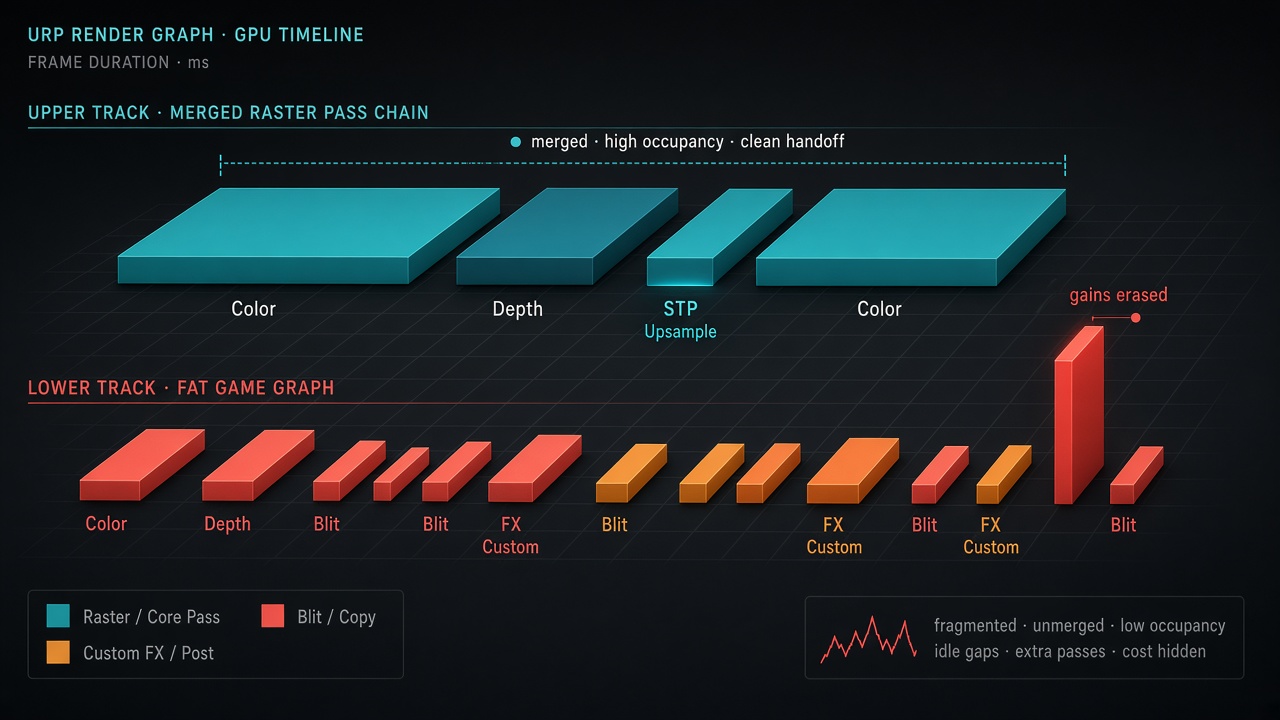
That same caveat applies once the graph itself starts fragmenting. URP Render Graph only pays off when you merge raster work and cut pass count, and that is especially true on tile-based GPUs. Extra passes force the CPU and GPU to park more data in memory and pull it back. WebGPU does not forgive that tax just because the Graphics APIs list put it first.
Reuse URP Copy Color and Copy Depth instead of rolling your own blit chain. Those extra copies are the usual reason a WebGPU session still hitch-stutters like a mid-range phone: you paid for compute and Resident Drawer, then spent the frame on full-screen transfers that never needed to exist. STP upscaling is a WebGPU-only lever and it is the right one for 1080p-class looks on iGPUs, but it cannot salvage a graph that already split into extra post-processing passes. Upscale a merged path, not a pile of disconnected effects.
Keep the WebGL budget a subset, not a second stack
Custom fat-game outlines, heat haze, and full-screen brand FX that break pass merging will erase the CPU you just won by putting pellets on GPU Resident Drawer. If an effect cannot live inside a merged URP pass, it does not belong on the WebGPU path either—treat it as clutter that does not qualify. Keep the WebGL visual budget as a merged-graph subset of the WebGPU graph, not a second post stack with its own blits, volumes, and camera stacking. Profile pass count per backend. Do not assume WebGPU is faster because the API list says so; BindGroup cost and extra raster passes can still lose to a quieter WebGL 2 graph on the same hardware.
Reinvest the CPU in Fish-Net, then publish the two-cohort matrix
Once the graph is merged and the extra blits are gone, the win is not more URP features. The main thread you just bought back belongs to interpolation, interest management, and spawn churn—the work that actually keeps a fat IO lobby honest—not another renderer feature WebGL cannot run.
Treat graphicsDeviceType as a visual budget, never as a netcode branch. The same tick rate, the same observer rules, the same spawn authority apply on both backends. If a player lands on silent WebGL 2 after Graphics Device Filtering, they still connect, still tick, still see the same match. What they do not get is GPU Resident Drawer, GPU occlusion, or STP. Spending that leftover CPU on extra outlines, haze, or brand FX that only compile on compute is how you re-split the graph and erase the Resident Drawer path you just gated.
The 1 GB host cap versus the 16 GB heap
Unity Play will only host Web builds under 1 GB compressed. Fat atlases and BatchRendererGroup shader-variant bloat compete for that cap the moment you enable GPU Resident Drawer. Keep the WebGPU-only variants, but do not ship unused Forward+/Deferred+ permutations, unused STP permutations, or a second copy of every pellet material “just in case.” The compressed package is the ship gate; the runtime heap is the arena gate.
Setting Web maximum memory above 4 GB automatically enables WebAssembly64 and allows up to 16 GB of heap. That is the real lever for dense persistent arenas—more pellets, more observer state, more interpolation history—not another post-process pass. Pair the 16 GB heap with a ruthless 1 GB upload budget: Resident Drawer earns its variant cost only if those instances actually leave the CPU.
The matrix QA has to sign on one build
Publish an explicit matrix before you freeze the player. WebGPU plus Forward+ (or Deferred+) gets GPU Resident Drawer, GPU occlusion, and STP on clutter that actually qualifies. Filtered adapters and WebGL 2 sessions get a merged-graph visual budget—no compute skinning, no STP, no Resident Drawer—and the same Fish-Net rules. Two visual budgets, one simulation.
QA signs off both cohorts on the same build, because the fallback will not fail loudly. Log graphicsDeviceType at boot, walk the HTTPS path Unity Play already hosts, and refuse to treat a silent WebGL session as a graphics bug. If interpolation, observers, and spawn churn hold on both sides of the matrix, the title is shippable. Extra URP features that only one cohort can run are not.
Key Takeaways
Ship the two-cohort URP matrix on one WebGPU-first build, then profile pass count and Fish-Net spawn churn on the adapters you actually allow.
Frequently Asked Questions
You Might Also Like
- URP Optimization Unity 6 URP GPU Resident Drawer for High-Entity Multiplayer IO Games with Fish-Networking
- Performance What Runs Where: Splitting Fish-Net Simulation and URP Rendering for Browser IO Fat Games
- Fish-Net Multiplayer Fish-Net Bayou WebGL Transport for Seamless Multiplayer Browser IO and Fat Games in Unity
- Browser Game Development Unity URP Mobile Rendering Optimization for Browser Games
- Performance Optimization Unity URP Draw Call Reduction Techniques